
How to use EdgeBeacon
Most people skim this once and never come back, which is fine. If you're new, three things to know. EV tells you whether a bet is worth taking. The tabs are different lenses on the same odds. The filters help you stop scrolling and start finding the good stuff faster.
Quick concepts
What is EV?
EV stands for expected value. The plain-English version: is this bet worth taking? A bet has positive EV (written +EV) when the price a sportsbook is offering is better than the actual probability the bet hits. Take enough +EV bets and you come out ahead in the long run, even when any single one is still a coin flip.
A 5% EV bet means that for every $100 you risk on bets like it, you'd expect to make about $5 over a large sample. Variance is real. Short losing streaks happen even when every bet was +EV. EV is still the number that actually matters.
Implied vs. predicted probability
Every price on a sportsbook board comes with an implied probability, which is just the odds restated as a percentage. A price of -200 implies the bet hits about 67% of the time. A price of +150 implies about 40%.
The predicted probability (also called the fair probability) is our estimate of how often the bet actually hits, based on the full market. When predicted is higher than implied, you've got an edge, and that's where +EV comes from. When it's lower, the book is asking you to pay a premium and you should pass.
What's a "sharp" book?
A sharp book is a sportsbook whose lines tend to be the most accurate. Their prices reliably end up close to the true probability by game time. Sharp books take big bets from professional bettors instead of limiting them, so their prices have to be honest. Most retail US sportsbooks are not sharp. They shade prices toward whichever side the public is loading up on.
EdgeBeacon leans on the sharp side of the market when figuring out what a fair line should look like. That's the engine under the hood you don't have to think about.
What does calibration mean?
Calibration is the test of whether our predictions are honest. If we say a bet has a 60% chance to hit, then across all the bets we tag at "60%", they should hit close to 60% of the time. Not 50%. Not 70%.
We track this constantly. If our model starts being too optimistic on a particular kind of bet, we shrink it back toward the market until the numbers line up again. It's why you'll sometimes see edges quietly move down a few percentage points week to week. That's calibration doing its job.
Wondering why some picks lose? Because they're supposed to. A "70% to hit" bet still loses 30 times out of 100, and those 30 don't all space themselves out neatly. Losing three +EV bets in a row is normal. Losing six in a row happens more than you'd think. Stake size and bankroll discipline matter a lot more than any one pick.
Tab-by-tab guide
Picks
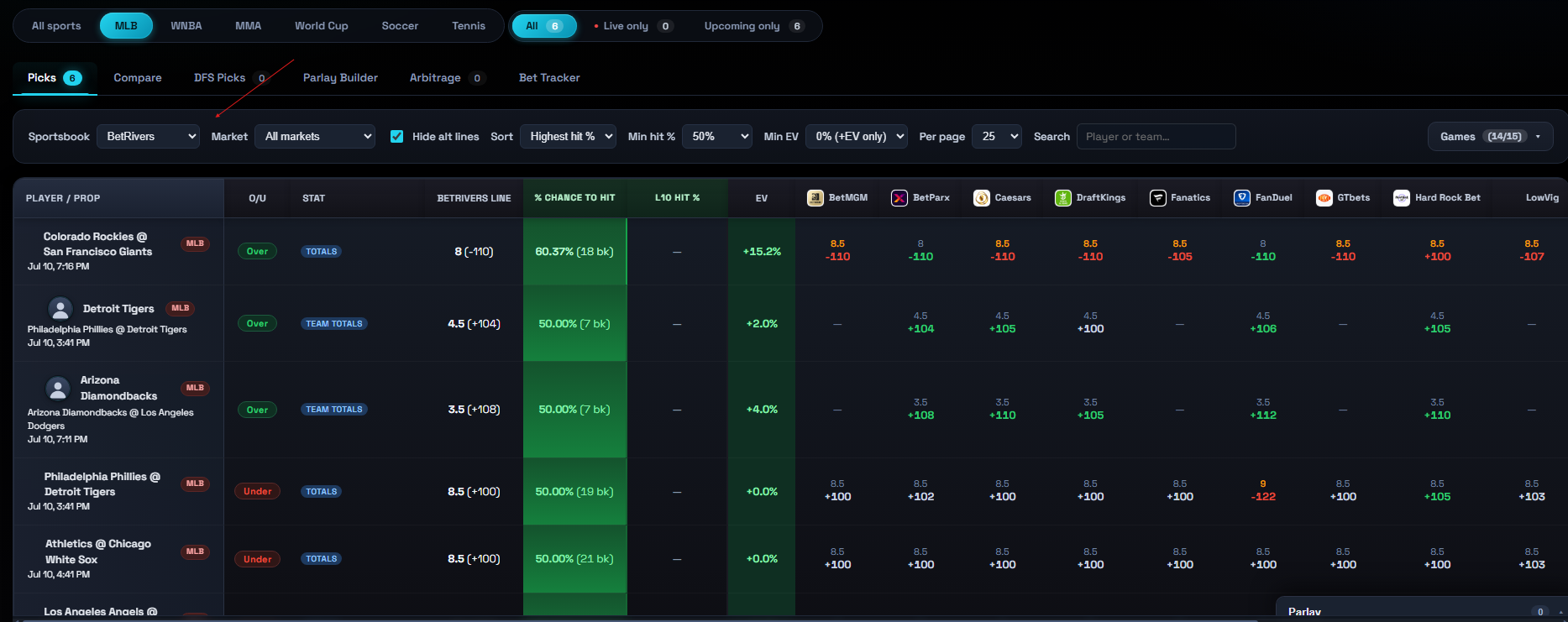
When to use it. This is the home base. Open the app, glance here, see what's worth betting right now. The Picks tab filters predictions by sportsbook — the Sportsbook dropdown (arrow below) sets which book's lines you're grading, and every row shown is a line where our predicted probability beats that book's price, sorted by edge. The rest of the filter bar narrows the results from there.
How to read it. Each row is a single bet. The EV column is the size of the edge. The Best column shows which book is posting the sharpest price for that side, and what the odds are there. Hit %, predicted, and the line itself round it out.
Try this. Set Min EV to 3% and Min books to 4 to leave only edges the market confirms. Click any row to drop it into the parlay slip, then send it to your Bet Tracker.
Compare
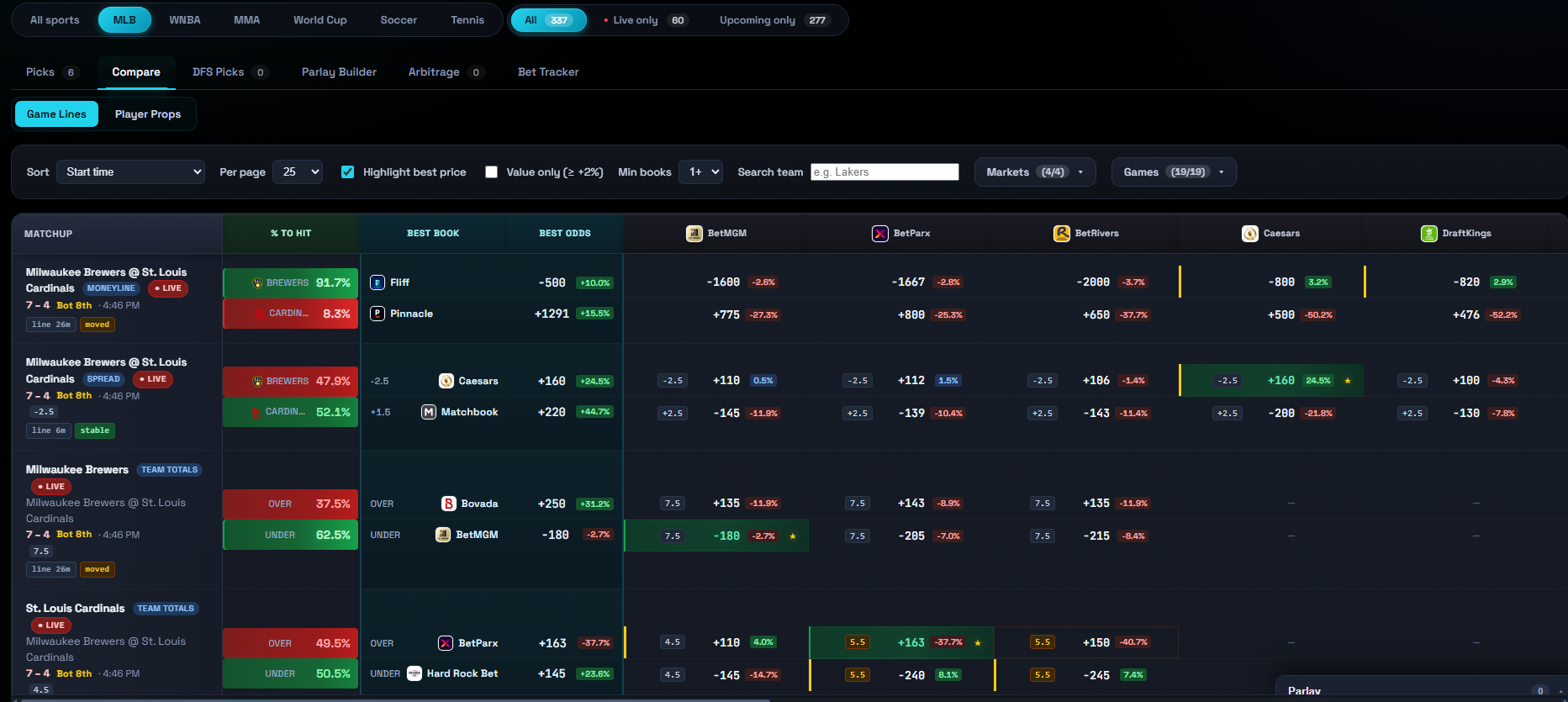
When to use it. When you've already got a side in mind and want to see who's pricing it best. Or when you want to eyeball how much disagreement there is across the market on a single line. A big spread between books is itself a tell.
How to read it. Each row is a market (e.g. "Yankees -1.5") and each column is a sportsbook. The cyan-highlighted cell is the best available price. Use the sub-toggle at the top to switch between Game Lines and Player Props.
Try this. Narrow the sportsbook picker to just the books you use so the grid isn't 20 columns wide. Click a side's % to Hit cell, its Best Odds, or any book price to add it to the parlay slip.
DFS Picks
When to use it. If you play PrizePicks, Underdog, DraftKings Pick6, Fliff, or any of the other pick-em apps. DFS apps post their own static lines that often drift away from where the sharp market has settled. That drift is the edge.
How to read it. Each row is a DFS line and a side (over or under). The EV figure is how much value you'd capture vs. the sharp market. Rows are grouped by app so you can scan the one you actually play on. Click a row to add it to the parlay slip.
Try this. Use the Odds range filter to hide extreme favorites. By default it floors at -500, so trivially-likely legs (like Under 0.5 doubles at -1865) don't flood the "highest hit %" sort. Clear the field to see everything.

Parlay Builder
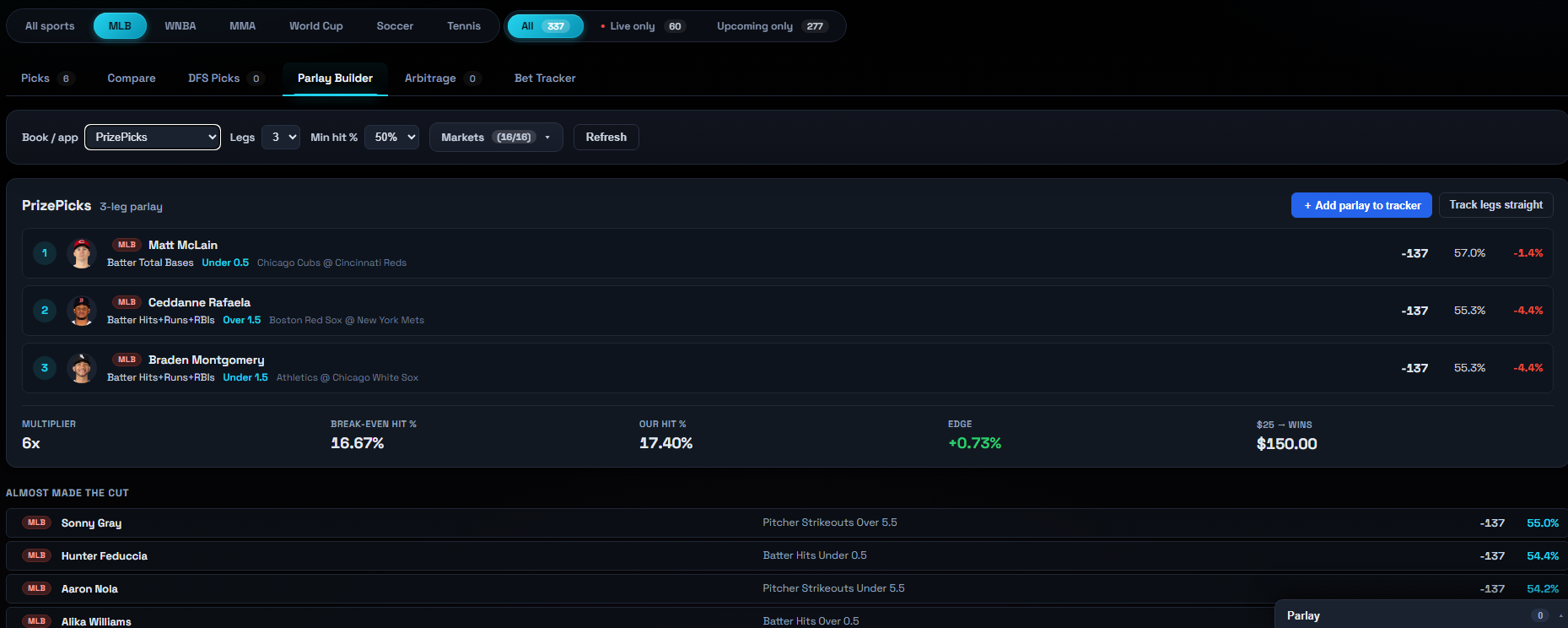
When to use it. When you want to stack two or more legs into a single ticket. The builder shows you a true combined EV, not just the marketing payout your book flashes at you.
How to read it. The slip on the right collects legs as you click them on Picks, Compare, or DFS, and shows the combined odds and edge. The Parlay Builder tab also auto-generates an optimal parlay for a book — you can remove a leg or swap in one of the "almost made the cut" alternates and watch the numbers recompute.
Try this. Parlay variance is brutal. A 3-leg parlay where each leg is 70% to hit lands only about 34% of the time. Smaller stakes, more tickets, longer view.
Arbitrage
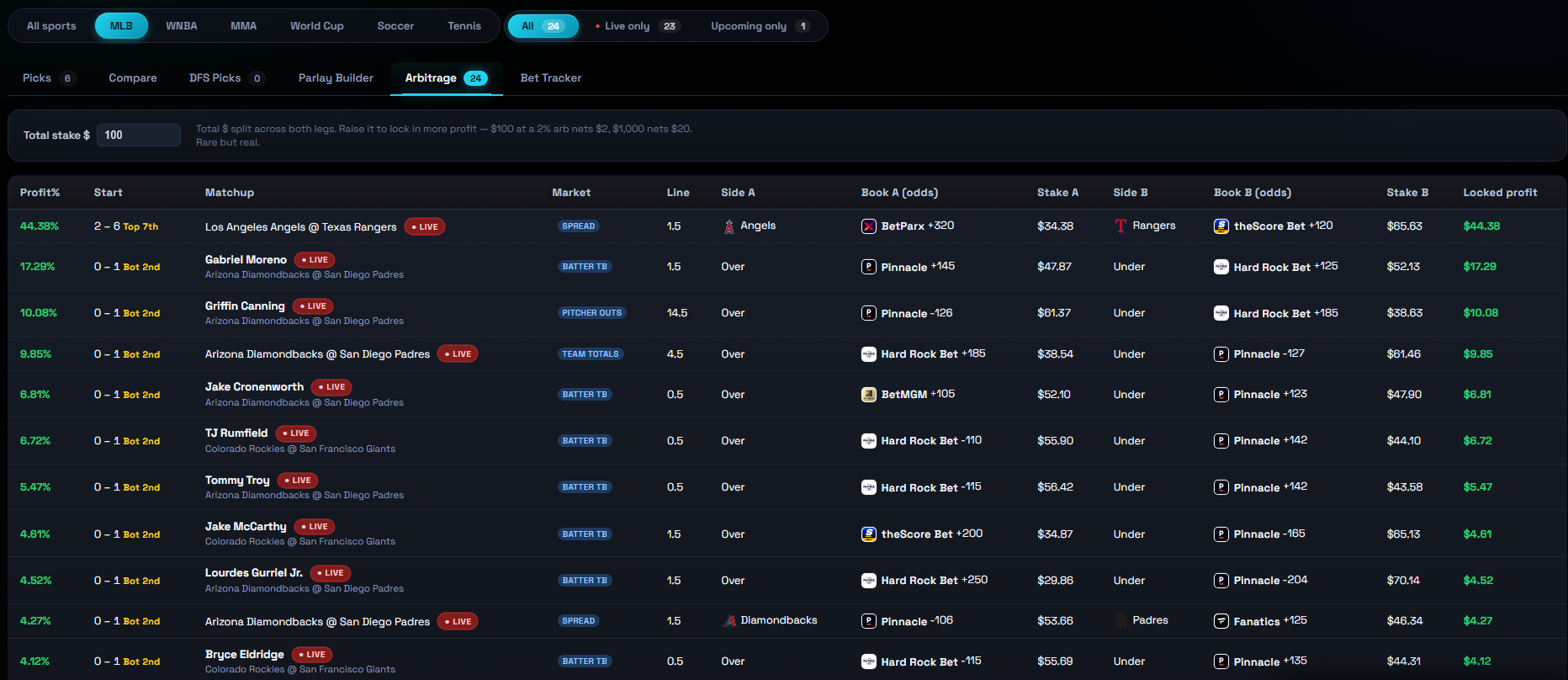
When to use it. When you want a guaranteed return regardless of how the game shakes out. Arbitrage is when one book is high enough on one side and another book is high enough on the other side that betting both sides locks in a profit.
How to read it. Each row is an arb opportunity: both sides, both books, both stake amounts, and the locked-in profit percentage. These are rare and they don't last long, so when one shows up, you're racing other bettors to it.
Heads up. Books don't love arb bettors and may limit accounts that hit too many. If account longevity matters to you, mix arbs in with normal +EV bets instead of going all in.
Bet Tracker
When to use it. To keep a running record of the bets you place and see whether you're actually winning. It tracks your net profit, ROI, win rate, and CLV (closing line value) over time.
How to read it. Open bets sit up top with one-click Won/Lost/Push buttons; settled bets fall below with their result, P&L, and CLV. The stat cards and the two charts (profit over time, profit by sportsbook) summarize how you're doing.
Try this. Log bets the fast way: click a pick on Picks, Compare, or DFS to add it to the slip, then hit Track in the slip (as straight bets or as a parlay). It auto-fills the matchup, odds, and your edge so the tracker can grade CLV later. Or use + Log a bet manually for anything you placed elsewhere.

Filter glossary
Min hit %
The minimum predicted probability a bet has to clear to show up. Set this higher (say 60%+) if you don't want to see longshots. Set it low (or off) if you're hunting for big-payout swings and you're okay with most of them losing.
Min EV
The minimum edge a bet has to clear. 2-3% is a reasonable floor for normal play. Anything smaller can get eaten by closing line movement. 5%+ is where you start seeing high-confidence plays. Don't chase 15%+ edges blindly. If the edge looks too big, something is usually off about that line.
Max odds
Caps how chalky (favored) a bet can be. If you don't want to lay -300 just to grind out a small return, set Max odds to -200 or -150. This filter is purely about your appetite for short prices. It doesn't change the EV calculation.
Odds range (DFS)
On the DFS Picks tab, hides legs whose price falls outside a min/max American-odds window. The default floor of -500 drops extreme favorites that the "highest hit %" sort would otherwise pile at the top. Leave a field blank to remove that bound.
Min books
The minimum number of sportsbooks that have to be posting a price on that line for it to show up. Higher means more reliable, because thin markets sometimes throw off bad numbers. We default this to a sensible value; bumping it up to 4 or 5 is a quick way to filter to higher-quality edges.
Sport filter
Toggle which sports you want to see. Switching sports resets your other filters to that sport's defaults so you don't have to redo setup every time you flip from MLB to WNBA.
Market filter
Narrows the bet types: moneyline, spread, totals, player props, and so on. Useful if you only ever bet, say, player props or only first halves, and you want everything else off the board.
Games filter
Limits the slate to specific matchups. By default every game is included, but if you're focused on one or two games tonight, this is the fastest way to clear the noise.
Sportsbooks filter
Picks which books contribute to the table. If you only have accounts at a few books, narrow this down to just those. It'll change the "best book" recommendation to only show prices you can actually go bet. Want to see international books too? Turn on Show international sportsbooks in your account settings.
Still have questions? Email support@edge-beacon.com. We read everything.
Photo credits. US-league player headshots come from the leagues' public media CDNs. Some soccer player photos are sourced from Wikimedia Commons under Creative Commons licenses (CC BY / CC BY-SA); click any such photo in the app to view its source page with the author and license. Team logos are served from ESPN's public CDN and remain the property of their respective leagues and clubs.